Token authentication
Summary
A hands-on walkthrough of token authentication in Dotkernel API.
It explains how the Authorization header determines whether a caller is a guest, a user or an admin, lists the shipped credentials and OAuth clients, then shows the curl requests for generating and refreshing both admin and user access tokens, the success and failure responses for each, and a start-to-finish test of both flows.
What is token authentication?
Token authentication means making a request to an API endpoint while also sending a special header that contains an access token. The access token was previously generated by (usually) the same API as the one you are sending requests to, and it consists of an alphanumeric string.
How does it work?
To protect specific resources, clients need to be authenticated with user/admin roles.
These roles are identified from the access token sent via the Authorization header.
When Dotkernel API receives a request, it tries to read the access token.
If it does not find an access token, client has guest role:
- if the requested endpoint needs no authentication, the requested resource is returned
- else, a
403 Forbiddenresponse is returned
Else, client's account is identified and client has admin/user role (the one assigned in their account)
- if the requested endpoint is accessible to the client, the requested resource is returned
- else, a
403 Forbiddenresponse is returned
Dotkernel API provides out-of-the-box both an admin and a user account.
Credentials
The admin account with role set to both superuser and admin with the following credentials:
- identity:
admin - password:
dotadmin
The user account with role set to both user and guest with the following credentials:
- identity:
test@dotkernel.com - password:
dotkernel
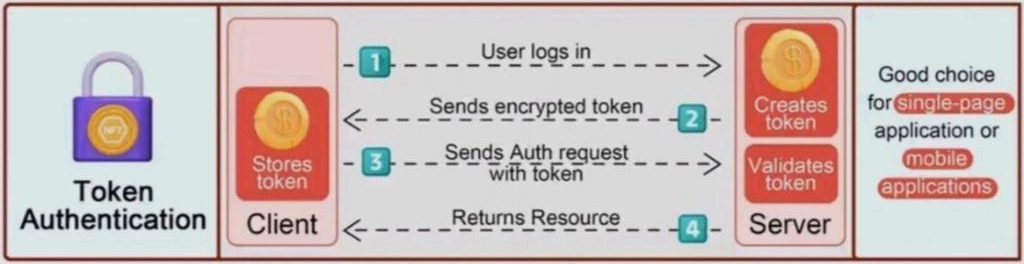
Flow
- client sends API request with credentials
- API returns a JSON object containing a new access and refresh token
- client sends API request using
Authenticationheader containing the previously generated access token - API returns requested resource
Note
The first two steps need to be executed only once. Access token should be stored and reused for all upcoming requests. Refresh token should be stored and used to refresh the expired access token.
For a better overview of the flow, see the below image:
Generate admin access token
Send a POST request to the /security/generate-token endpoint with Content-Type header set to application/json.
Set the request body to:
{
  "grant_type": "password",
  "client_id": "admin",
  "client_secret": "admin",
  "scope": "api",
  "username": "<identity>",
  "password": "<password>"
}
Note
Replace
<identity>with your admin account'sidentityand<password>with your admin account'spassword. Both fields come from tableadmin.
Test using curl
Execute the below command:
curl --location 'https://api.dotkernel.net/security/generate-token' \
--header 'Content-Type: application/json' \
--data-raw '{
  "grant_type": "password",
  "client_id": "admin",
  "client_secret": "admin",
  "scope": "api",
  "username": "admin",
  "password": "dotkernel"
}'
Generate a user access token
Send a POST request to the /security/generate-token endpoint with Content-Type header set to application/json.
Set the request body to:
{
  "grant_type": "password",
  "client_id": "frontend",
  "client_secret": "frontend",
  "scope": "api",
  "username": "<identity>",
  "password": "<password>"
}
Note
Replace
<identity>with your user account'sidentityand<password>with your user account'spassword. Both fields come from tableuser.
Test using curl
Execute the below command:
curl --location 'https://api.dotkernel.net/security/generate-token' \
--header 'Content-Type: application/json' \
--data-raw '{
  "grant_type": "password",
  "client_id": "frontend",
  "client_secret": "frontend",
  "scope": "api",
  "username": "test@dotkernel.com",
  "password": "dotkernel"
}'
Response on success
You should see a 200 OK response with the following JSON body:
{
    "token_type": "Bearer",
    "expires_in": 86400,
    "access_token": "eyJ0eXAiOiJKV1QiLCJhbGciOiJSUzI1NiJ9.e...wuE39ON1mS5mnTKfA_dSpSWxOmNQdny_AKIbc1qZjMfS24qSUV8HIoOw",
    "refresh_token": "def502005a035c8dfe5456d27e85069813a4f8...0b844e843cd62865662a0e723165752dfd7012491502d3d819c2a61d"
}
Field description:
token_type: token type to be set when sending theAuthorizationheader (example:Authorization: Bearer eyJ0e...)expires_in: access token lifetime (modify in:config/autoload/authentication.global.php>authentication.access_token_expire;config/autoload/local.phpin 7.2 and earlier)access_token: generated access token (store it for later use)refresh_token: generated refresh token (store it for regenerating expired access token)
Response on failure
You should see a 400 Bad Request response with the following JSON body:
{
    "error": "Invalid credentials.",
    "error_description": "Invalid credentials.",
    "message": "Invalid credentials."
}
Refresh admin access token
Send a POST request to the /security/refresh-token endpoint with Content-Type header set to application/json.
Set the request body to:
{
  "grant_type": "refresh_token",
  "client_id": "admin",
  "client_secret": "admin",
  "scope": "api",
  "refresh_token": "<refresh-token>"
}
Test using curl
Execute the below command:
curl --location 'https://api.dotkernel.net/security/refresh-token' \
--header 'Content-Type: application/json' \
--data-raw '{
  "grant_type": "refresh_token",
  "client_id": "admin",
  "client_secret": "admin",
  "scope": "api",
  "refresh_token": "<refresh-token>"
}'
Note
Make sure you replace
<refresh-token>with the refresh token generated with the access token.
Refresh user access token
Send a POST request to the /security/refresh-token endpoint with Content-Type header set to application/json.
Set the request body to:
{
  "grant_type": "refresh_token",
  "client_id": "frontend",
  "client_secret": "frontend",
  "scope": "api",
  "refresh_token": "<refresh-token>"
}
Test using curl
Execute the below command:
curl --location 'https://api.dotkernel.net/security/refresh-token' \
--header 'Content-Type: application/json' \
--data-raw '{
  "grant_type": "refresh_token",
  "client_id": "frontend",
  "client_secret": "frontend",
  "scope": "api",
  "refresh_token": "<refresh-token>"
}'
Note
Make sure you replace
<refresh-token>with the refresh token generated with the access token.
Response on success
You should see a 200 OK response with the following JSON body:
{
    "token_type": "Bearer",
    "expires_in": 86400,
    "access_token": "eyJ0eXAiOiJKV1QiLCJhbGciOiJSUzI1NiJ9.e...wuE39ON1mS5mnTKfA_dSpSWxOmNQdny_AKIbc1qZjMfS24qSUV8HIoOw",
    "refresh_token": "def502005a035c8dfe5456d27e85069813a4f8...0b844e843cd62865662a0e723165752dfd7012491502d3d819c2a61d"
}
Field description:
token_type: token type to be set when sending theAuthorizationheader (example:Authorization: Bearer eyJ0e...)expires_in: access token lifetime (change here:config/autoload/authentication.global.phpauthentication->access_token_expire;config/autoload/local.phpin 7.2 and earlier)access_token: generated access token (store it for later use)refresh_token: generated refresh token (store it for regenerating expired access token)
Response on failure
You should see a 401 Unauthorized response with the following JSON body:
{
    "error": "invalid_request",
    "error_description": "The refresh token is invalid.",
    "hint": "Cannot decrypt the refresh token",
    "message": "The refresh token is invalid."
}
Test admin authentication flow
Step 1: Fail to fetch protected API content
Try to view your admin account by executing:
curl --location 'https://api.dotkernel.net/admin/my-account'You should get a 403 Forbidden JSON response.
Step 2: Generate an access token
Generate an admin access token by executing:
curl --location 'https://api.dotkernel.net/security/generate-token' \
--header 'Content-Type: application/json' \
--data-raw '{
  "grant_type": "password",
  "client_id": "admin",
  "client_secret": "admin",
  "scope": "api",
  "username": "admin",
  "password": "dotkernel"
}'
You should get a 200 OK JSON response.
Store the value of access_token for later use.
Step 3: Successfully fetch protected API content
Try again viewing your admin account by executing:
curl --location 'https://api.dotkernel.net/admin/my-account' \
--header 'Authorization: Bearer <access_token>'
Replace <access_token> with the previously stored access token.
You should get a 200 OK JSON response with the requested resource in the body.
Test user authentication flow
Step 1: Fail to fetch protected API content
Try to view your admin account by executing:
curl --location 'https://api.dotkernel.net/user/my-account'You should get a 403 Forbidden JSON response.
Step 2: Generate an access token
Generate an admin access token by executing:
curl --location 'https://api.dotkernel.net/security/generate-token' \
--header 'Content-Type: application/json' \
--data-raw '{
  "grant_type": "password",
  "client_id": "frontend",
  "client_secret": "frontend",
  "scope": "api",
  "username": "test@dotkernel.com",
  "password": "dotkernel"
}'
You should get a 200 OK JSON response.
Store the value of access_token for later use.
Step 3: Successfully fetch protected API content
Try again viewing your admin account by executing:
curl --location 'https://api.dotkernel.net/user/my-account' \
--header 'Authorization: Bearer <access_token>'
Replace <access_token> with the previously stored access token.
You should get a 200 OK JSON response with the requested resource in the body.
FAQ
Q: Which header carries the access token?
A: Authorization, using the token type from the response — for example Authorization: Bearer eyJ0e....
Q: What happens if I send no token at all?
A: The caller is treated as a guest.
Public endpoints still respond; protected ones return 403 Forbidden.
Q: Why do admin and user tokens use different clients?
A: Each account type has its own OAuth client: admin for accounts in the admin table and frontend for accounts in the user table.
The client_id and client_secret must match the account you are authenticating.
Q: Do I have to generate a token for every request?
A: No. Generate it once, store it, and reuse it until it expires — then refresh rather than re-authenticate.
Q: What is the difference between the generate and refresh requests?
A: Generating uses grant_type: password with a username and password; refreshing uses grant_type: refresh_token with the refresh token and no credentials.
Q: How long is an access token valid?
A: 86400 seconds — one day — configurable via authentication, access_token_expire in config/autoload/authentication.global.php (config/autoload/local.php in 7.2 and earlier).
Q: I get 400 Bad Request with "Invalid credentials". What should I check?
A: The username and password, and that client_id and client_secret match a row in oauth_clients.
Both credential fields come from the admin or user table depending on the account type.
Q: I get 401 Unauthorized with "The refresh token is invalid". Why?
A: The refresh token could not be decrypted — it is malformed, has expired, or was issued for a different client than the one in the request.
Q: Are the shipped credentials safe to keep?
A: No.
The admin / dotadmin and test@dotkernel.com / dotkernel accounts, and the OAuth clients whose secrets equal their names, must be changed or removed before production.
See OAuth2 security.
Q: Where should the tokens be stored on the client?
A: Somewhere private to the client. Never commit them or write them to logs, and send them only over HTTPS. See Authentication.