File structure
Summary
A tour of the directories a default Dotkernel API installation ships with — bin for CLI entry points, config and config/autoload for application and service configuration, data for caches, lock files and OAuth keys, log for daily logs, public as the web entry point, and src for the modules — plus the folders and files each module is expected to contain.
Details
The Dotkernel API file structure follows the PSR-4 standards. Standardizing the file structure of your project is considered good practice because it makes it easier to find and navigate the code.
When using Dotkernel API, the following structure is installed by default:
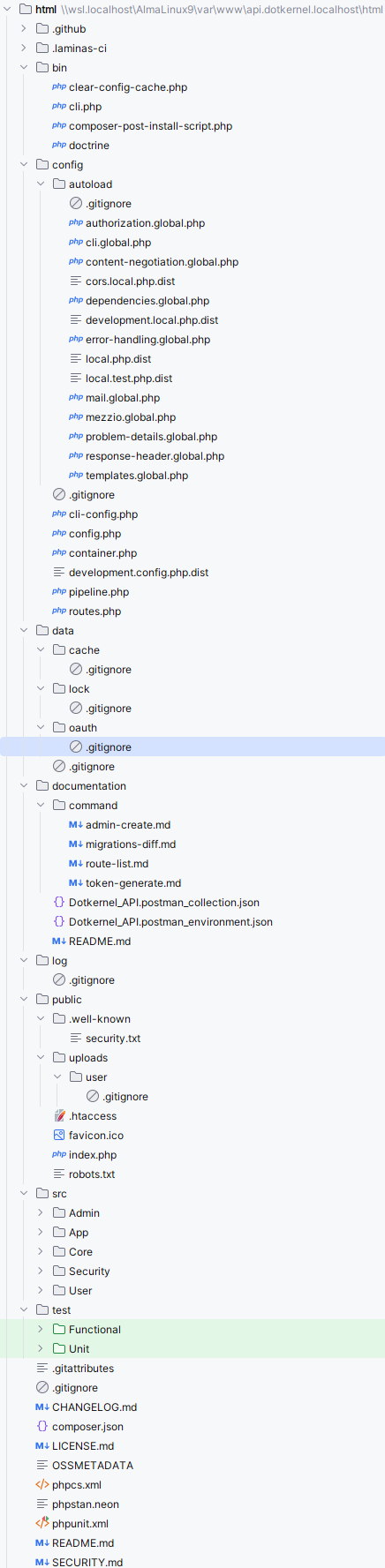
Special purpose folders and files
.github- Contains GitHub workflow files.laminas-ci.json- laminas-ci configuration; a single file, not a folderdocumentation- Postman and Bruno collections for the shipped endpoints, plus notes on the CLI commands
bin folder
This folder contains:
clear-config-cache.php- Removes the config cache filedata/cache/config-cache.php; can also be invoked ascomposer clear-config-cachecli.php- Used to build console applications based on laminas-clicomposer-post-install-script.php- Runs aftercomposer installand copies the shipped distributable config files into place; it asks nothing and needs no inputdoctrine- Doctrine ORM console, used by the fixtures commands to populate the database tablesgenerate-oauth2-keys.php- Generates the OAuth2 key pair and encryption key intodata/oauthgenerate-openapi.php- Generates the OpenAPI document; run throughcomposer openapi
config folder
This folder contains all application-related config files:
cli-config.php- Doctrine Migrations entry point; builds theDependencyFactoryfrom thedoctrine.migrationsconfigconfig.php- Registers ConfigProviders for installing packages, and sets the config cache pathcontainer.php- Main service container that provides access to all registered servicesdevelopment.config.php.dist- Activates debug mode; gets symlinked asdevelopment.config.phpwhen enabling development modepipeline.php- Contains a list of middlewares, in the order of their executionroutes.php- Application-wide route registration; ships empty, because each module declares its own routes in itsRoutesDelegator
Note
There is no
config/migrations.php. Migration settings — thedoctrine_migration_versionstable and thesrc/Core/src/App/src/Migrationpath — are declared inCore\App\ConfigProviderand read throughconfig/cli-config.php.
config/autoload folder
This folder contains all service-related local and global config files:
authorization.global.php- Configures access per route for user rolescli.global.php- Configures clicontent-negotiation.global.php- Configures request and response formatscors.local.php.dist- Configures Cross-Origin Resource Sharing, like call origin, headers, cookiesdependencies.global.php- Sets global dependencies that should be accessible by all modulesdevelopment.local.php.dist- Gets symlinked into place when enabling development mode; activates error handlerserror-handling.global.php- Configures and activates error logslocal.php.dist- Local configuration file: database credentials, application name and URL, OAuth2 key pathslocal.test.php.dist- Local configuration for functional testsmail.local.php.dist- Mail configuration; e.g. sendmail vs smtp, message configuration, mail logging. Not committed: the post-install script copies it out ofdotkernel/dot-mailduring installationmezzio.global.php- Mezzio core config fileopenapi.global.php- Configures the generated OpenAPI document: output file, version, info, servers, tags and security schemesproblem-details.global.php- Maps HTTP status codes to thetypeURI used in problem details responsesresponse-header.global.php- Defines headers per routetemplates.global.php- ConfiguresApi\App\Template\RendererInterface, including thephtmltemplate extension
Note
Doctrine is not configured from this folder. There is no
doctrine.global.php; ORM, migration and fixture settings come from the moduleConfigProviders, and connection credentials from the local config file.
data folder
This folder is a storage for project data files and service caches. It contains these folders:
cache- Holdsconfig-cache.php, the merged configuration cache written whenConfigAggregator::ENABLE_CACHEis onoauth- Encryption, private and public keys needed for authenticationlock- Contains lock files generated bydotkernel/dot-cli
AVOID storing sensitive data on the repository!
Note
There is no
data/doctrine. Migrations live insrc/Core/src/App/src/Migrationand fixtures insrc/Core/src/App/src/Fixture, both inside theCoremodule.
log folder
This folder stores daily log files.
When you access the application from the browser, (if not already created) a new log file gets created in the format specified in the config/autoload/error-handling.global.php config file under the stream array key.
public folder
This folder contains all publicly available assets and serves as the entry point of the application:
uploads- Normally contains files uploaded via the application.htaccess- Server configuration file used by Apache web server; it enables the URL rewrite functionality.well-known- Containssecurity.txt, the RFC 9116 contact file for reporting vulnerabilitiesfavicon.ico- The site icon browsers request by defaultindex.php- The application's main entry pointrobots.txt- Allows or denies bot access to parts of your application; it is a live file, so edit it to match your environment
src folder
This folder contains a separate folder for each Module.
These are the modules included by default:
Admin- Contains functionality for managing users withadminrole; note these are users save in theadmindatabase tableApp- Contains functionality such as error reportingCore- Contains core functionality, from authentication, to renderingSecurity- Contains security-related functionalityUser- Contains functionality for managing regular users
Core is itself split by domain under src/Core/src, into Admin, App, Security, Setting and User.
See Core and App.
Module contents
Each Module folder, in turn, should contain the following folders, unless they are empty:
src/Handler- Action classes (similar to Controllers but can only perform one action)src/Entity- Used by database entitiessrc/Service- Service classessrc/Repository- Entity repository folder
The above example is just some of the folders a project may include, but they should give you an idea about the recommended structure.
Other classes the src folder may include are InputFilter, EventListener, Helper, Command, Factory etc.
The src folder in each Module folder normally also contains these files:
ConfigProvider.php- Configuration data for the moduleOpenAPI.php- Detailed descriptions for each endpoint in the OpenAPI formatRoutesDelegator.php- Module specific route registrations
templates folder in Modules
This folder contains the template files, used, for example, to help render e-mail templates.
Of the shipped modules only User has one, at src/User/templates/user.
Templates are rendered by
Api\App\Template\Renderer, a lightweight renderer for files combining PHP and HTML. All template files have the extension.phtml. The extension is set inconfig/autoload/templates.global.phpand Twig is not used anywhere in the application.
See Rendering and sending emails.
FAQ
Q: Which standard does the structure follow?
A: PSR-4 autoloading, so a class's namespace maps directly onto its path.
Q: Where does my own code go?
A: In a new folder under src, alongside the default Admin, App, Core, Security and User modules.
See Core and App.
Q: Which files must every module have?
A: ConfigProvider.php for its configuration, RoutesDelegator.php for its routes and OpenAPI.php for its endpoint documentation.
Q: What folders does a module typically contain?
A: Handler, Entity, Service and Repository, omitting any that would be empty.
Modules commonly also add InputFilter, EventListener, Helper, Command and Factory.
Q: Which directories need to be writable?
A: data, log and public/uploads.
See Clone the project.
Q: What is the application's entry point?
A: public/index.php.
Only the public folder is served directly; everything else is routed through it by the .htaccess rewrite rules.
Q: Where is the middleware pipeline defined?
A: config/pipeline.php, which lists the middlewares in execution order.
See Middleware flow.
Q: Why is config/routes.php empty?
A: Because routes are declared per module.
Each module's RoutesDelegator is registered as a delegator on Mezzio\Application in its ConfigProvider, so config/routes.php is left as an empty callable for application-wide routes you may want to add.
Q: What is the difference between config and config/autoload?
A: config holds application-level wiring — the container, the pipeline, the config aggregator.
config/autoload holds per-service configuration, split into committed *.global.php files and uncommitted local ones shipped via their distributable equivalents.
Q: Where are the database migrations and fixtures?
A: In src/Core/src/App/src/Migration and src/Core/src/App/src/Fixture.
Both paths are declared in Core\App\ConfigProvider, not in a file under config.
See Generate database migrations.
Q: Where are the OAuth2 keys kept?
A: In data/oauth.
They are generated by bin/generate-oauth2-keys.php during installation and must never be committed.
See OAuth2 security.
Q: Which templating engine is used?
A: None of the usual ones.
Api\App\Template\Renderer renders .phtml files directly; there is no Twig anywhere in the codebase.
See Rendering and sending emails.