File structure
Summary
This page describes the folders and files installed with Dotkernel Frontend, from bin, config, data, log and public to the modules in src.
It also describes what each module folder is expected to contain.
Details
Dotkernel Frontend follows the PSR-4 standards.
It is considered good practice to standardize the file structure of projects.
When using Dotkernel Frontend the following structure is installed by default:
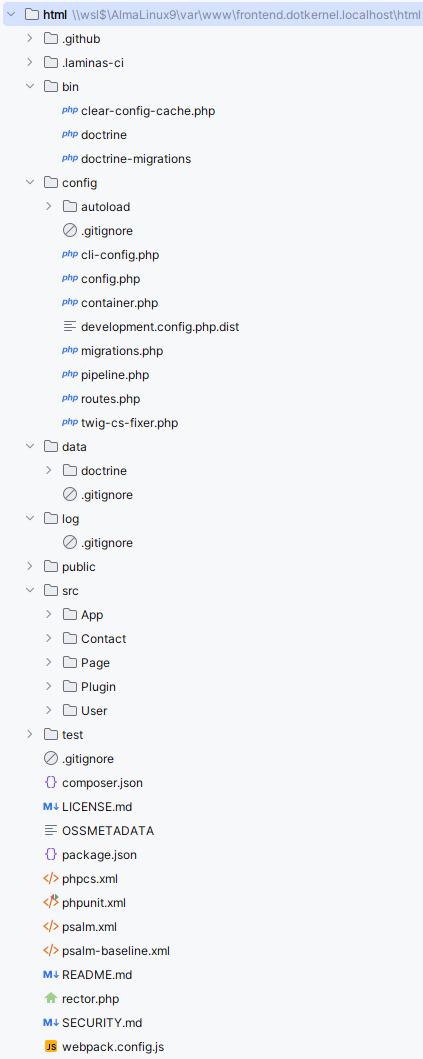
Special purpose folders
.github- Contains workflow files.laminas-ci- Containspre-run.sh, which prepares the laminas-ci environment (installs sqlite3, copies the local config files) before the PHPUnit jobs
bin folder
This folder contents are
clear-config-cache.php- Removes the config cache filedata/cache/config-cache.php; also available ascomposer clear-config-cachecomposer-post-install-script.php- Runs aftercomposer install/composer updateand copieslocal.php.dist,local.test.php.dist(development only) and dot-mail'smail.global.php.distintoconfig/autoloadwhen they are missingdoctrine- Used by the doctrine fixtures to populate the database tablesdoctrine-migrations- Used to create the database tables
config folder
This folder contains all application-related config files:
cli-config.php- Command line interface configuration used by Doctrine Migrationsconfig.php- Registers ConfigProviders for installing packagescontainer.php- Main service container that provides access to all registered servicesdevelopment.config.php.dist- Activates debug mode; gets symlinked asdevelopment.config.phpwhen enabling development modemigrations.php- Configuration for database migration, like migration file location and table to save the migration logpipeline.php- Contains a list of middlewares, in the order of their executionroutes.php- Application-level route registration; empty by default, as each module registers its own routes in itsRoutesDelegatortwig-cs-fixer.php- Configuration file for Twig code style checker/fixer
config/autoload folder
This folder contains all service-related local and global config files:
app.global.php- Configures basic app variablesauthentication.global.php- Defines the User identityauthorization.global.php- Configures permissions for user rolesauthorization-guards.global.php- Configures access per route for user rolescors.global.php- Configures Cross-Origin Resource Sharing, like call origin, headers, cookiesdependencies.global.php- Config file to set global dependencies that should be accessible by all modulesdevelopment.local.php.dist- Gets symlinked asdevelopment.local.phpwhen enabling development mode; activates error handlersdoctrine.global.php- Configuration used by Object–relational mappingerror-handling.global.php- Configures and activates error logslocal.php.dist- Local config file where you can overwrite application name and URLlocal.test.php.dist- Local configuration for functional testsmail.global.php- Mail configuration defaults (sendmail vs esmtp, message options, SMTP options); not shipped in the repository, it is copied fromvendor/dotkernel/dot-mail/config/mail.global.php.distbybin/composer-post-install-script.php; it is not ignored by git, so keep SMTP credentials in amail.local.phpinsteadmezzio.global.php- Mezzio core config filenavigation.global.php- dotkernel/dot-navigation menu containers (left_menu,guest_menu,user_menu,user_profile_menu)response-header.global.php- Defines headers per routesession.global.php- Configures the sessiontemplates.global.php- dotkernel/dot-twigrenderer config file
data folder
This folder is a storage for project data files and service caches. It contains these folders:
cache- Created at runtime and ignored by git; holds the config cache, the Doctrine cache and compiled Twig templatesdoctrine- Database migrations and fixtures
AVOID storing sensitive data on the repository!
log folder
This folder stores daily log files.
When you access the application from the browser, (if not already created) a new log file gets created in the format specified in the config/autoload/error-handling.global.php config file under the stream array key.
public folder
This folder contains all publicly available assets and serves as the entry point of the application:
cssandjs- Contains the css and js file(s) generated by the webpack (npm) from the assets folderfontsandimages- Contain the font and image file(s) copied by the webpack (npm) from the assets folderuploads- contains user avatar images, stored underuploads/user/{userUuid}/.htaccess- server configuration file used by Apache web server; it enables the URL rewrite functionalityindex.php- the application's main entry pointrobots.txt.dist- a sample robots.txt file that allows/denies bot access to certain areas of your application; activate it by duplicating the file asrobots.txtand comment out the lines that don't match your environment
src directory
This folder contains a separate folder for each Module.
These are the modules included by default:
App- Core functionality, from authentication, to rendering, to error reportingContact- Contains functionality for the contact us formPage- Contains functionality for displaying a pagePlugin- Contains plugin functionality for dynamic forms and templatesUser- Contains functionality for users, from login and registering, to account management
Module contents
Each Module folder, in turn, should contain the following folders, unless they are empty:
src/Controller- Action classessrc/Entity- Used by database entitiessrc/Repository- Entity repository foldersrc/Service- Service classes
The above example is just some of the folders a project may include, but they should give you an idea about the recommended structure.
Other folders the src folder may include are Form, Fieldset, InputFilter, EventListener, Factory, Middleware, Enum, DBAL etc.
The App module also contains an assets folder (fonts, images, js, scss), which webpack compiles into public.
The src folder in each Module folder normally also contains these files:
ConfigProvider.php- Configuration data for the moduleRoutesDelegator.php- Module specific route registrations
templates directory for modules
This directory contains the template files.
twigis used as Templating Engine. All template files have the extension.html.twig.
FAQ
Q: Where do I register a new route?
A: In the module's RoutesDelegator.php.
config/routes.php is empty by default, because each module registers its own routes.
Q: Where should I put passwords and other local settings?
A: In config/autoload/local.php or another config/autoload/*.local.php file.
config/autoload/.gitignore ignores local.php and *.local.php, so they are never committed.
Q: Where are uploaded avatars stored?
A: In public/uploads/user/{userUuid}/, as set by the uploads key in config/autoload/local.php.
Q: Where do I edit the CSS and JavaScript?
A: In src/App/assets.
Webpack compiles them into public/css and public/js when you run npm run watch or npm run prod.
Q: How do I add a new module?
A: Create src/<Module>/src with a ConfigProvider.php (and a RoutesDelegator.php if it has routes).
Add a Frontend\\<Module>\\ PSR-4 entry to composer.json, register the ConfigProvider in config/config.php, and run composer dump-autoload.