Request Lifecycle for a Mezzio-Based Application
Summary
The eleven steps a Dotkernel Light request travels through, from public/index.php to the emitted response.
Details
The request lifecycle is the sequence of steps that happen from the moment a user makes an HTTP request until the server sends back a response.
The graph below shows how the request is handled by Dotkernel Light.
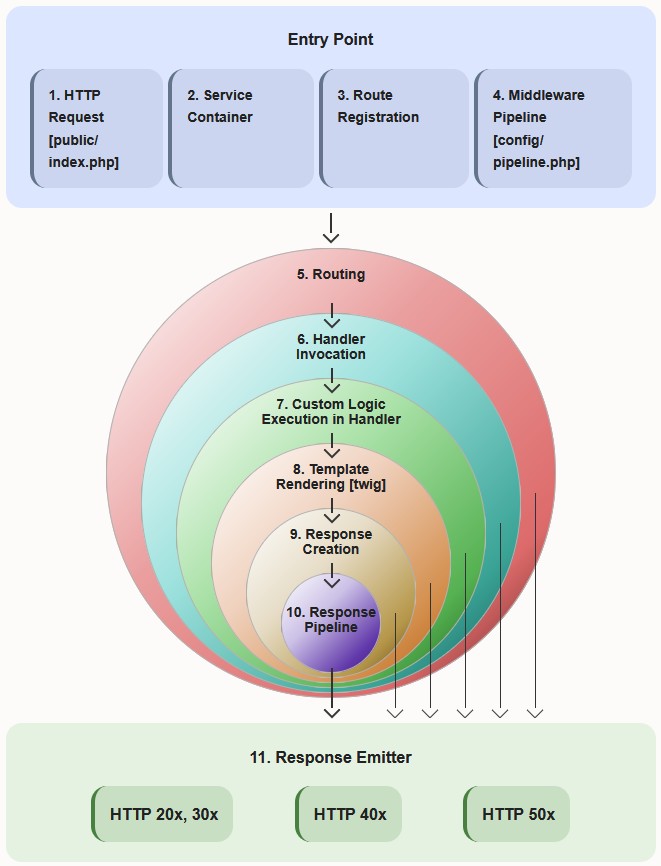
Request Lifecycle Step-by-Step
The following list describes what each of the steps from the graph does in Dotkernel Light.
1. HTTP Request [public/index.php]
- Bootstrap the application.
- Load configuration.
- Create the Mezzio application instance.
2. Service Container
Register:
- Factories.
- Aliases.
- Delegators.
All services are configured and ready to use.
3. Route Registration
Read all available routes with their allowed request methods and dynamically register them in the application. Routes are managed by FastRoute.
Example
| Item | Value |
|---|---|
| Match | /page/about -> GetPageViewHandler |
| Method | GET |
| Route name | page::about |
4. Middleware Pipeline [config/pipeline.php]
Loads the predefined order of middleware. It defines how incoming HTTP requests move through the application and how responses are generated.
5. Routing
FastRoute matches the URL and method against registered routes.
Example
| Item | Value |
|---|---|
| Match | GET /page/about |
| Handler | GetPageViewHandler |
| Route name | page::about |
6. Handler Invocation
Extract the matched route name from the request and pass it to the renderer.
$template = $request->getAttribute(RouteResult::class)->getMatchedRouteName();
// $template = 'page::about';
7. Custom Logic Execution in Handler
Execute the business logic in the handler. The process can involve services and any custom logic.
8. Template Rendering
Twig loads the template, applies layout, renders blocks and includes partials.
Example
| Item | Value |
|---|---|
| Load | src/Page/templates/page/about.html.twig |
| Extends | @layout/default.html.twig |
| Render blocks | title, content |
| Include partials | alerts.html.twig, etc. |
| Output | Final HTML |
9. Response Creation
An HtmlResponse is created with status, headers and the rendered HTML body.
Example
| Item | Value |
|---|---|
| Status | 200 OK |
| Content-Type | text/html; charset=utf-8 |
| Body | Rendered HTML |
10. Response Pipeline
The response flows back through the middleware stack. Middleware can modify headers, cookies, compress content, etc.
11. Response Emitter
The final response is sent back to the browser. The page is rendered and sent to the user.
FAQ
Q: How many steps does a Dotkernel Light request go through?
A: Eleven, from the initial HTTP request in public/index.php to the response emitter.
Q: Which component matches the URL to a handler? A: FastRoute, in the routing step.
Q: How does a handler know which template to render?
A: It reads the matched route name off the request, for example page::about, and passes it to the Twig renderer.